Choosing an App to Practise Speaking English: What Really Matters
A speaking app can't replace another person, but it can give you what most learners lack: far more time speaking. Here's how to pick one that really makes you talk.
On this page
If you can read English but freeze when you have to speak, you're not alone. The usual cause isn't a lack of grammar. It's a lack of speaking time. Many learners say only a few sentences of English in a whole week, and nobody gets better at something they rarely do.
That is what a speaking app can fix. It can't give you a real conversation, but it can get you talking every day, without anyone waiting for you to finish. This guide explains what to look for, what to be careful about, and how to find out in a week whether an app is working.
What a speaking app can and can't do
| Good for | Not so good for |
|---|---|
| Daily practice without pressure | Real-time reactions from a real person |
| Rehearsing situations before they happen | Understanding different people and accents in the moment |
| Building speed with common phrases | Being interrupted and having to recover |
| Getting used to hearing your own voice | The nerves of talking to someone new |
So think of an app as your daily training, not the match itself. The aim is to arrive at real conversations with more phrases ready and less fear. Our guide to speaking English fluently shows how these fit together.
Six features that make a real difference
1. You speak in whole sentences
This is the most important test. Repeating single words or tapping the right answer isn't speaking practice. Look for tasks where you answer a question, describe something or give an opinion in your own words.
2. You can hear yourself
Listening back to your own recording is uncomfortable and very useful. You'll notice where you stop, which words you avoid and what you'd say differently. An app should make this easy.
3. There's a model answer to compare
Hearing how someone else handled the same task shows you phrases you could have used. The best sequence is to speak first and only then listen to the model, so you find out what was missing.
4. You get help before you start
Useful phrases for the task help you begin, especially at lower levels. A good design gradually takes that support away as you improve, so you learn to manage without it.
5. It matches your level
Tasks that are too hard make you give up, and tasks that are too easy teach you nothing. Check that the app knows your level, and find out how it decides. If you don't know your level, take a free level test first, bearing in mind that it covers grammar, vocabulary, reading and listening, not speaking.
6. The feedback is honest about its limits
Automatic feedback can be useful. Speech-to-text can show you what the system heard, and AI feedback can suggest a more natural way of saying something. But a transcript is only a guess at what you said, so it can mishear you. Be careful with apps that give you a precise pronunciation score or promise to judge your accent. Treat any score as a rough guide, not a verdict.
What about AI conversation partners?
AI chat partners can be helpful because they're patient and always available, and they let you try out ideas without embarrassment. They have limits too: they tend to be very agreeable, they rarely push back the way people do, and their corrections aren't always right. Use them for extra speaking time, and check anything important before you rely on it.
Test any app in a week
You can find out whether an app works without paying for a year. Before you start, record yourself answering a simple question for one minute, such as "What did you do last weekend?" Then use the app for ten minutes a day for a week. At the end, answer the same question again and compare the two recordings.
- Did you speak for longer without stopping?
- Did you use a phrase that you didn't have before?
- Was it easier to start?
- How many minutes did you actually spend speaking, rather than tapping or listening?
If the last answer is "not many", then try something else. Plenty of apps feel busy without getting you to say much. You can also do a lot with no app at all, using the methods in our guide to practising speaking alone.
How speaking practice works in Fluentra
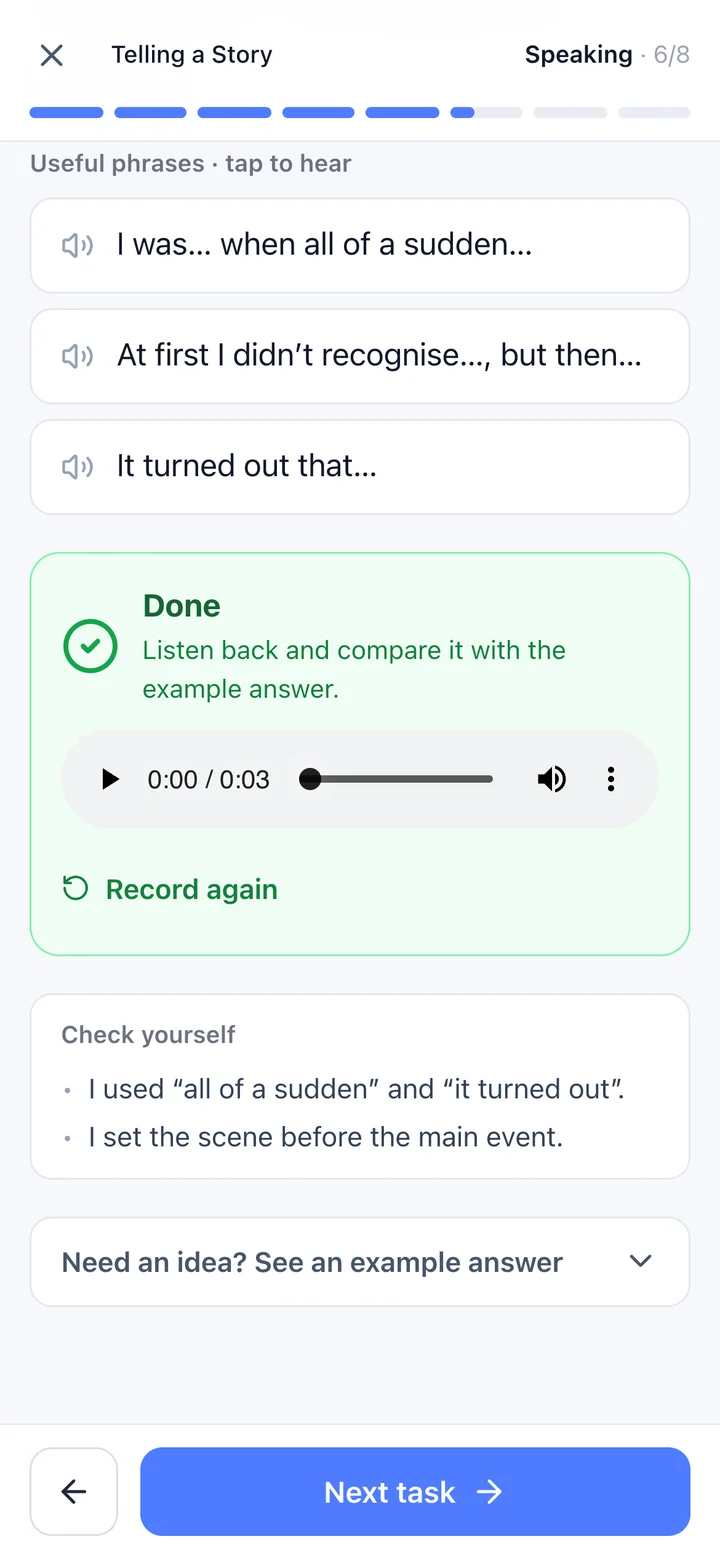
A speaking task in a Fluentra lesson: record, play back, compare.
Every lesson in Fluentra's CEFR courses, from A1 to C1, includes speaking tasks. You record your answer, play it back and compare it with an example answer. If you tap Check my answer, your recording is sent for transcription so you can get feedback, and we don't keep the audio. Otherwise, it stays on your device.
The feedback works from the transcript, so it can tell you when a word wasn't clear because it was heard as another word, but it doesn't score your sounds and it doesn't judge your accent. It's also feedback only: there's no pass or fail, and you can continue even if it wasn't perfect.
There are limits you should know about. There are no video calls or classes with a teacher, so Fluentra won't replace practice with real people. When you can talk for a couple of minutes on familiar topics, add a tutor, a class or a language exchange. Lessons 1 and 2 of every course are a free preview once you sign in, so you can try the speaking tasks before deciding.
Combine it with real people
Whichever app you choose, the goal is to use it less for rehearsal and more for preparation. Practise the phrases you'll need for a real situation, such as a meeting, a phone call or a trip, and then go and use them. That is when all the practice starts to pay off.
Questions people ask
What is the best app to practise speaking English?
The best one is the one that gets you speaking in whole sentences every day, at your level, and lets you hear yourself. Test it for a week: record yourself before and after, and compare the two.
Can an app really improve my spoken English?
It can improve your speed, confidence and range of phrases, because it gives you far more speaking time. It can't fully replace real conversation, so add real people once you can talk for a couple of minutes on familiar topics.
Can an app correct my pronunciation?
Partly. Listening to your own recording next to a model helps a lot, and speech recognition can show which words weren't clear. Treat automatic pronunciation scores as a rough guide, because they aren't reliable judgments of how well people understand you.
Does Fluentra have live speaking lessons?
No. There are no video calls or classes with a teacher. You record your answers, compare them with an example and can ask for feedback on what you said.